
The Warehouse
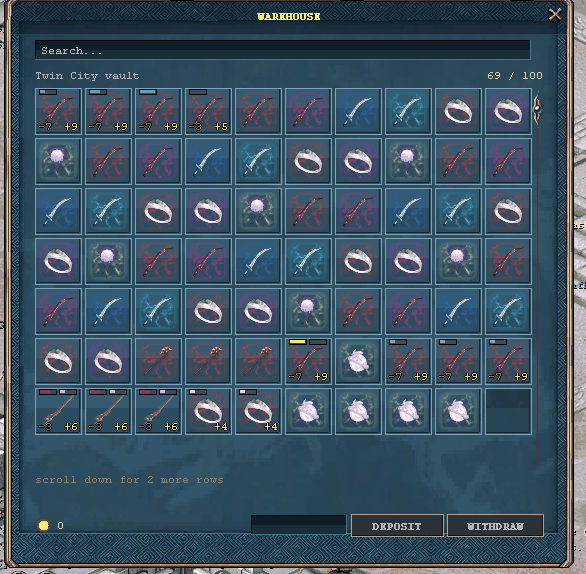
The panel names the city whose vault you are standing in, so two stashes can never be confused, and every cell carries the same marks your backpack uses — see reading an item.
A Warehouseman holds your items for you. You'll find one in most cities, and one in the
Market.
Every warehouse is its own stash
This is the part that surprises people: warehouses are not shared. What you leave with the
Twin City Warehouseman is in Twin City — you can't collect it from Phoenix Castle. Each
Warehouseman keeps a separate stash, so it's worth remembering where you put things.
How many slots you get
| Where | Slots |
|---|---|
| Any city warehouse | 100 |
| The Market warehouse | 100, and you can buy up to 200 |
City warehouses are 100 slots and stay 100 slots. The Market is the one that grows.
Extending the Market warehouse
Talk to the Market Warehouseman, or use the +20 SLOTS button at the bottom of the
warehouse window. Each extension adds 20 slots, and each one costs more than the last:
| Extension | Adds | Cost | Market total |
|---|---|---|---|
| 1st | +20 | 500,000 silver | 120 slots |
| 2nd | +20 | 1,000,000 silver | 140 slots |
| 3rd | +20 | 1,500,000 silver | 160 slots |
| 4th | +20 | 2,000,000 silver | 180 slots |
| 5th | +20 | 2,500,000 silver | 200 slots |
Seven and a half million silver in total takes the Market warehouse from 100 to 200 slots.
Each extension is permanent and belongs to that character, not the account.
Two things worth knowing before you spend:
- It only applies to the Market warehouse. Buying it does not widen your city stashes.
- You can only buy it at the Market. A city Warehouseman will tell you where to go rather
than take your money.
Putting things in and taking them out
The warehouse window shows your whole stash at once, with a search box at the top — type part of
an item's name to find it in a full vault.
- To withdraw, click the item. It goes to your backpack, so you need a free slot.
- To deposit, either shift-click the item in your backpack, or drag it onto the
warehouse window. Anywhere on the grid works; you don't have to aim at an empty square. - Items must be in your backpack to be deposited — take off anything you're wearing first.
- If a warehouse is full, you'll be told so rather than having the item quietly vanish.
Storing silver
The row at the bottom of the window holds your vault balance. Type an amount and press
DEPOSIT to put silver in, or WITHDRAW to take it out. Silver in the vault is safe but
can't be spent until you withdraw it.
Warehouses and trading
An item sitting in a warehouse is stored, not carried. It can't be traded, sold at a booth or
put in a shop until you take it out — and while it's in there it does nothing for you: stored
gear grants no stats, no gems and no set bonuses. Only what you're actually wearing counts.