
Reading an Item
You should not have to hover forty slots to find the one piece worth keeping. Every item cell in
DYNASTIES carries its own identity card, and once you know the four marks you can read a full backpack
at a glance.
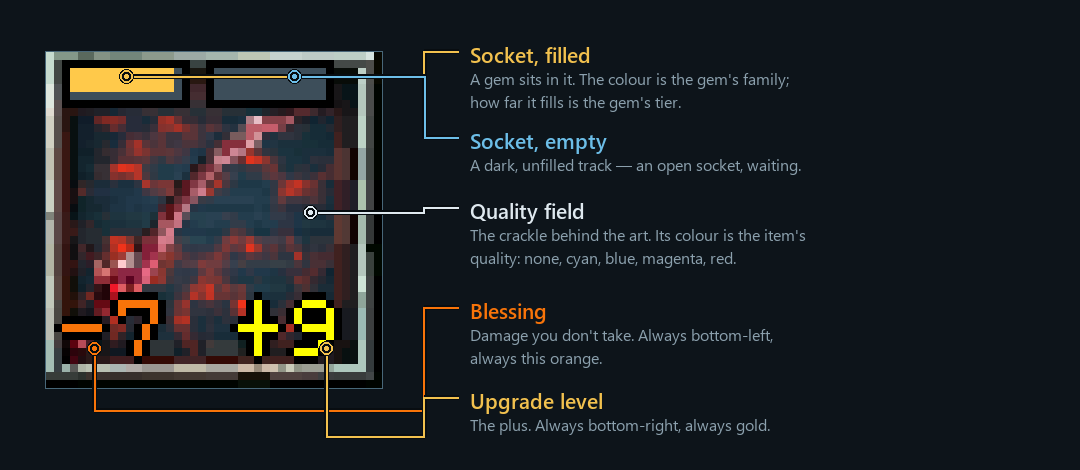
These marks are drawn on every item surface — your backpack, the vault, both
sides of a trade, the Artisan's upgrade window, and your own equipped gear.
The quality field
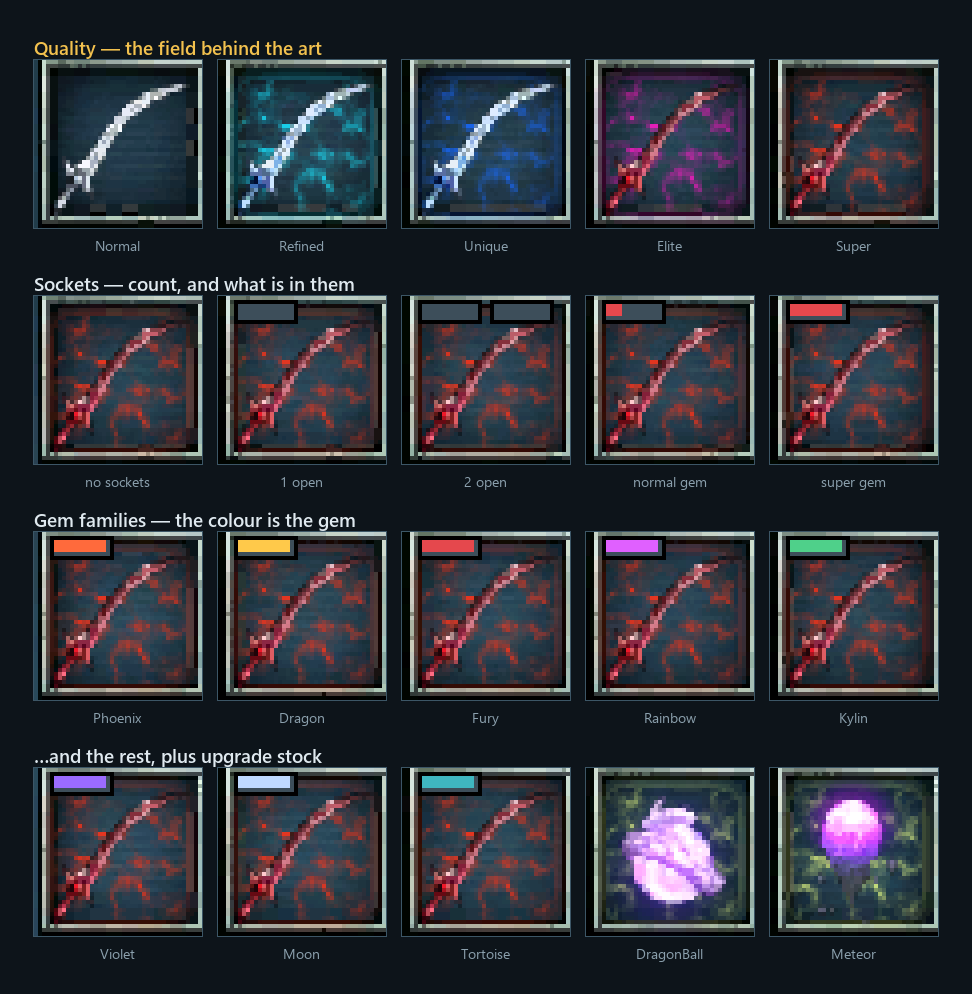
The animated crackle behind the art is the item's quality. It is the loudest signal a cell has, and
it is the one you read from across the window.
| Field | Quality | |
|---|---|---|
| nothing | Normal | the common run |
| Cyan | Refined | |
| Blue | Unique | |
| Magenta | Elite | |
| Red | Super | the best a drop can roll |
| Yellow-green | upgrade stock | DragonBalls and Meteors, so they never get lost in a full bag |
Only gear wears a quality field — weapons, armour, headwear, necklaces, rings, boots, shields,
quivers and garments. A potion or a quest item has none, which is itself information: no field means
nothing worth upgrading.
The upgrade level
Gold, bottom-right. The item's plus. Nothing shown means +0 — the mark only appears once there
is something to say. See gear & upgrading for what a plus costs and what it gives.
The blessing
Orange, bottom-left. The percentage of durability you don't lose when you die. It is drawn in the
same orange the item's own tooltip uses for its Damage: -7% line, on purpose — the mark on the cell
and the line in the card are the same fact in two places.
Sockets
The track along the top edge is the most information-dense mark on the cell, and it is worth
learning properly. Three separate things are encoded in it.
How wide the track is = how many sockets. Two slots means two sockets, one slot means one, and no
track at all means the item has none. This is the part that pays off: you can pick the socketed piece
out of a full backpack without touching anything.
Whether a slot is filled = whether a gem is in it. A dark, empty track is an open socket
waiting for a gem — worth money, and worth planning around.
A filled slot's colour = the gem's family.
| Colour | Gem |
|---|---|
| Fire orange | Phoenix |
| Gold | Dragon |
| Crimson | Fury |
| Magenta | Rainbow |
| Jade | Kylin |
| Violet | Violet |
| Pale blue | Moon |
| Teal | Tortoise |
How far it fills = the gem's tier. A third of the track is a normal gem, two thirds is
refined, the whole track is a super. So a full gold bar is a Super Dragon and a short gold one
is an ordinary Dragon — same family, very different item.
What each gem actually does is on the gear page.
The name carries the quality too
The catalog calls that weapon a LeafBlade. What you read on the tooltip is SuperLeafBlade — the
quality word is stuck on the front. That is why searching your vault for super finds every super you
own, and why searching for leafblade finds them regardless of quality.
Size, and what it tells you
In the backpack every cell is the same size, so the art fills what it fills — a poleaxe crowds its
cell, a ring sits small in the middle.
The equipment window is different: its slots are sized for what belongs in them. The weapon,
armour and off-hand slots are large; head, necklace, ring and boots are small. An empty slot draws a
silhouette of the kind of thing that goes there, so you can see what you are missing without knowing
the layout.
On the ground
Loot lying on the floor names its own quality by colour before you pick it up — a different
palette from the cell fields, and worth its own page:
ground loot colours.
Quick drill
Given a cell with a red field, a full gold bar beside an empty one, -7 and +9:
A Super weapon, +9, with -7% blessing, two sockets — one holding a Super Dragon
gem, one still open.
That is the item in the picture at the top of this page, and you read all of it without a single hover.
See also: gear & upgrading · hunting & drops ·
ground loot colours · the warehouse