
Reading loot on the ground
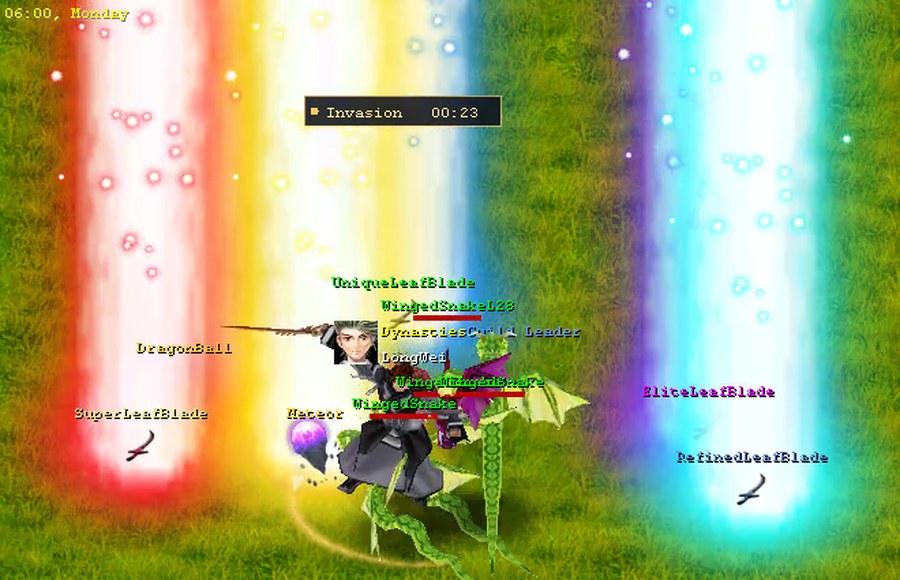
Four drops landing together. The column of light marks the drop the instant it falls; the
label colour tells you what it is once you look.
In the stock game every dropped item's floating name is the same yellow, whether it's a copper
coin or the best sword on the server — so the only way to tell was to walk over and click.
In DYNASTIES the ground label is coloured by quality, using the exact same colours the item's
hover tooltip already uses. What you read on the floor is what you'd read on hover:
Once it is in your bag it speaks a different visual language — see
reading an item.
| On the ground | Quality |
|---|---|
| White | ordinary items, money, potions and consumables |
| Blue | Refined |
| Green | Unique |
| Magenta | Elite |
| Pale gold | Super |
| Amber-gold | chase items — DragonBalls, Meteors, gems, upgrade stones, EXP potions |
A tiered drop also says its tier in the name: the floor reads SuperBuriedBlade, exactly like
the tooltip title, so a coloured label explains itself instead of just looking special. Ordinary and
chase items keep the plain name — a Meteor is just a Meteor, and the gold already says "valuable".
Amber is its own tier on purpose. A Meteor counts as "ordinary" by the game's own numbering,
which is nonsense to anyone actually playing — so the things people genuinely chase get their own
warm gold, above the quality ladder.
Every label is drawn over a soft dark shadow, the same way player and monster name-plates are, so
the colours stay readable on pale stone and bright sand as well as on grass — a white "ordinary"
label doesn't vanish into a marble floor.
Prefer the old look? The client's
dynasty-client.inihas a[ModuleR]section:enable = 0
restores the stock yellow-for-everything, andshadow = 0turns off just the drop shadow.