
Your characters — one account, many heroes
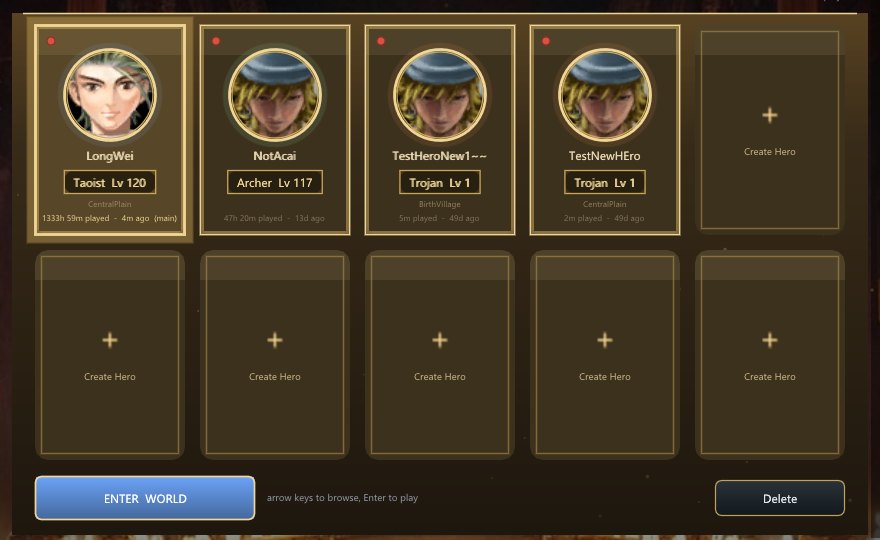
On DYNASTIES a single account can hold up to 10 characters. When you log in, a
Character Select screen appears before the world loads: your roster laid out as a grid of
slots — each an existing hero or an empty "Create Hero" slot. Pick one and play.
The select screen
Each filled slot shows the hero at a glance:
- a portrait and the name,
- the class (Trojan / Warrior / Archer / Taoist) and level,
- an online dot — green "IN WORLD" if that character is currently logged in, grey if not,
- when they last played.
Empty slots invite you to create a new hero. Click a slot to select it; the selected hero
gets a big ENTER WORLD button (and a Delete option).
Playing, creating, deleting
- Play — select a hero and click ENTER WORLD (the world loads as that character).
- Create — click an empty slot, enter a name, pick a class, and confirm. Your class is
permanent, so choose the path you want to walk. - Delete — with a hero selected, click Delete, then type the hero's name to confirm (a
deliberate guard against accidents). You can't delete a character while it's logged in somewhere.
One hero at a time
You own up to 10 characters, but only one is in the world at a time. Selecting a hero brings
you in as that character; if another of your characters is still logged in, that session is signed
out. (The green "IN WORLD" dot shows you which one — handy for reclaiming a session you left
running.) Switching heroes is just a matter of returning to the select screen and picking another.
The fine print
- Nothing is shared between your heroes' inventories or levels — each character is its own hero,
progressing on its own. (Account-wide rewards, where they apply, are noted on their own pages.) - Automated / test logins can pass a character by name or slot to skip the screen and drop
straight into that hero — a convenience for tooling, not something you need in normal play.
Every login lands on the Character Select screen — pick a hero (or forge a new one) to enter the world. The exact slot count is a per-season setting.