
Shift-click — one item, or everything like it
Dragging items one at a time is the slowest part of any tidy-up. Shift-click skips the drag: it
does whatever the window you have open is for.
Shift-click: the obvious thing
Hold SHIFT and left-click an item in your bag. What happens depends on what is open:
| open window | shift-click does |
|---|---|
| a shop | sells it |
| the warehouse | deposits it |
| a trade | offers it |
| the Artisan's improve window | places it — as the material, or as the item being upgraded |
| nothing | nothing. It is not a hotkey, it is a shortcut for the window you are already using |
Valuable, bound and special items still raise the shop's usual "Sell an Item" confirmation. Nothing
is skipped — shift-click uses the game's own handlers, so every check you would get by dragging
still runs.
CTRL+SHIFT: everything of that kind
Hold CTRL+SHIFT and hover an item. Every item of the same kind lights up with a gold border, and
everything else dims. Click, and the action runs on all of them.
Hovering a one-handed weapon selects every one-hander you are carrying — the blade, the axe, the
dagger, the scepter — because they are interchangeable:
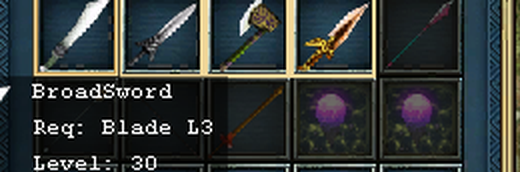
Hovering a two-hander selects the two-handers instead — the glaive, the poleaxe, the pike — and
leaves the one-handers alone:
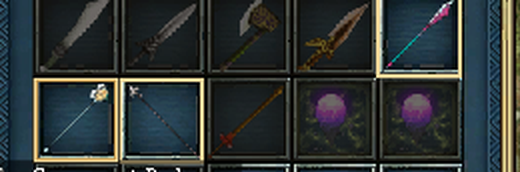
What counts as "the same kind"
The grouping is the same one the Artisan uses for composing. If two items can be fused together,
they select together — so what you learn at the oven works in your bag as well.
- All one-handed weapons are one group — blade, sword, hook, whip, axe, hammer, club, scepter, dagger.
- All two-handed weapons are another — glaive, poleaxe, long hammer, spear, halberd, wand.
- Backswords and bows stand alone, each their own group.
- Armour groups by body slot for your class: your helmets together, your body armour together.
- Earrings, necklaces, rings and boots each group with their own.
- Everything else groups by its own kind. Potions with potions, scrolls with scrolls.
One case is worth knowing because it surprises people: DragonBalls, Meteors and MeteorTears count
as one kind. They are the same upgrade currency as far as the Artisan is concerned, so they select
together — which is what you want when feeding the oven, and worth a second look before selling.
Every one of them asks for confirmation individually anyway (see below).
What it will not do
- Anything that would normally ask "Sell an Item?" still asks — once for each item, exactly as
if you had clicked them one at a time. Nothing valuable or bound is sold without you saying yes to
it, and cancelling one does not sell the rest. - It moves at most one bag's worth per click.
- It never selects anything you cannot see: what is highlighted is exactly what will move.